
OpenCart analytics and reporting, explained every morning.
One briefing every morning, built from your orders, your search traffic and your ad spend together. A free module connects the shop in about two minutes, and it can only read.
Read-only module. No theme changes. No customer names or addresses.- Versions
- OpenCart 3.0 and 4
- Connects via
- Free module, pasted key
- Access
- Read-only, every request signed
- Setup time
- About two minutes
- Refresh
- Every two hours
- Customer data
- Email and country only
OpenCart cannot hand its orders to anyone. The module adds a way to read them, and nothing more.
OpenCart's own API was made for the admin's order editor: it creates orders, it does not list them. So ManteIQ reads through a small module you install.
| OpenCart's built-in API | ManteIQ Connector | |
|---|---|---|
| Made for | The admin's own order editor | Reading orders for reports |
| Lists orders, products and statuses | No | Yes |
| Can change the shop | Yes, it creates and edits orders | No, it has no code that writes |
| Needs an IP allow-list | Yes | No, every request is signed with your key |
- Made forOpenCart's built-in APIThe admin's own order editorManteIQ ConnectorReading orders for reports
- Lists orders, products and statusesOpenCart's built-in APINoManteIQ ConnectorYes
- Can change the shopOpenCart's built-in APIYes, it creates and edits ordersManteIQ ConnectorNo, it has no code that writes
- Needs an IP allow-listOpenCart's built-in APIYesManteIQ ConnectorNo, every request is signed with your key
Connect OpenCart in four steps.
About two minutes: three steps in your OpenCart admin, one in ManteIQ.
- 01
Download the module
Pick the file for your OpenCart version. Keep its name as it is, manteiq.ocmod.zip: OpenCart names the extension after the file.
manteiq.ocmod.zip - 02
Upload it in the Installer
Open Extensions, then Installer, and upload the file. On OpenCart 4 click Install next to ManteIQ Connector in the list. OpenCart 3 installs it as soon as it is uploaded.
Extensions › Installer - 03
Install it under Modules
Open Extensions, then Extensions again, and choose Modules. Click Install next to ManteIQ Connector, then Edit. The module makes its key at that moment.
Extensions › Extensions › Modules - 04
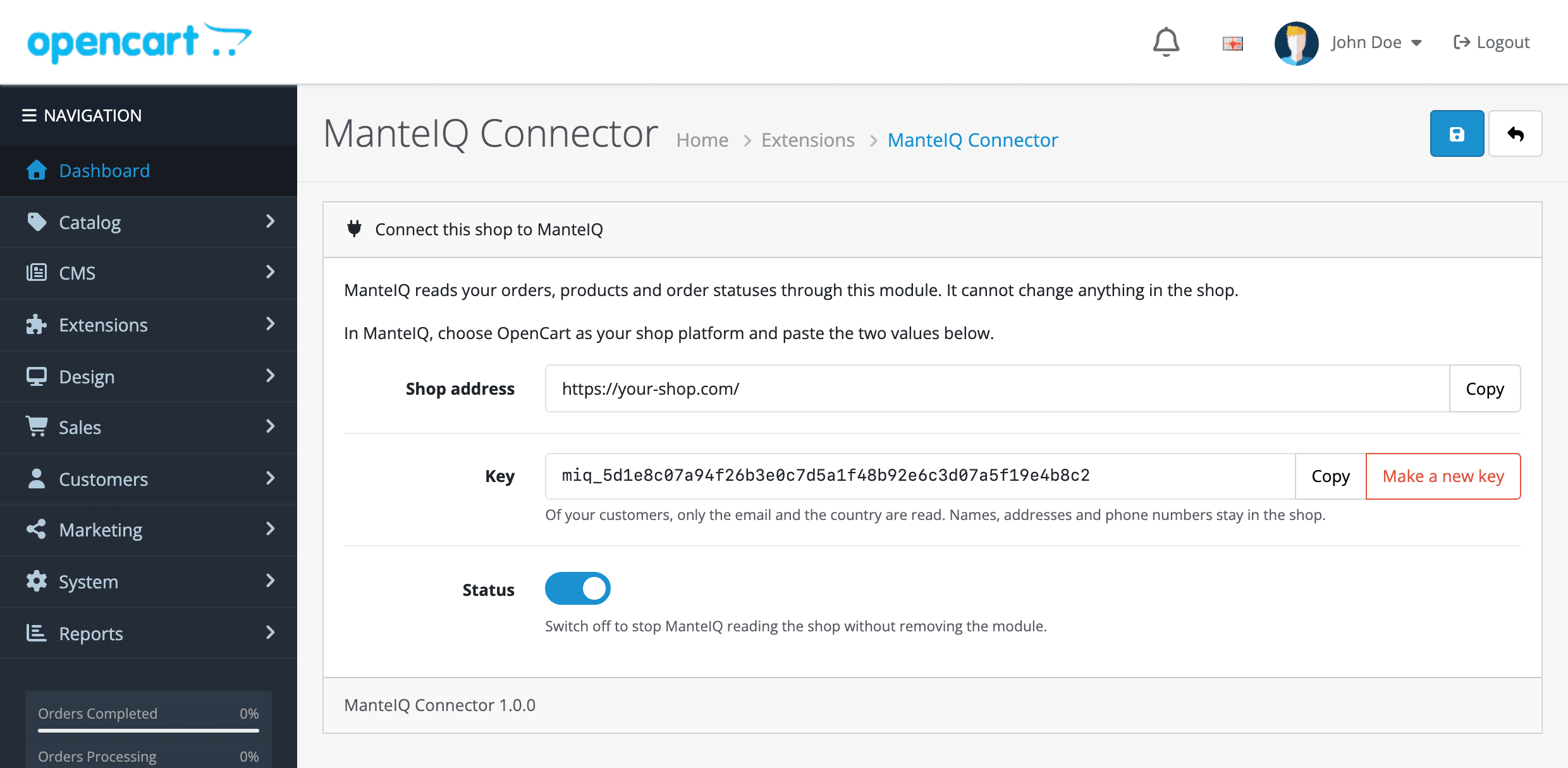
Paste the two values
The module's page shows your shop address and a key. Paste both into ManteIQ under Sources. The first read fetches sixteen months of orders, and your first briefing lands the next morning.
ManteIQ › Sources › OpenCart
What the module answers, and nothing else
Read requests only. Nothing the module answers can change the shop.| The module reads | ManteIQ uses it for |
|---|---|
| Orders with their totals | Every revenue and order figure |
| Order lines | Products and categories on the Sales page |
| Each order's status history | When an order was paid and shipped, by your shop's own record |
| Your order statuses and your shop's settings for them | Which orders count as a sale |
| Products and categories | Names, and the category each product belongs to |
| The buyer's email and country | New against returning buyers, and where orders ship |
- Orders with their totalsManteIQ uses it forEvery revenue and order figure
- Order linesManteIQ uses it forProducts and categories on the Sales page
- Each order's status historyManteIQ uses it forWhen an order was paid and shipped, by your shop's own record
- Your order statuses and your shop's settings for themManteIQ uses it forWhich orders count as a sale
- Products and categoriesManteIQ uses it forNames, and the category each product belongs to
- The buyer's email and countryManteIQ uses it forNew against returning buyers, and where orders ship
Shop data on one side, Google data on the other, one briefing out.
OpenCart
- Orders, revenue and what each order status means
- Line items, product names, categories, shipping methods, coupon codes
- Paid and shipped dates from each order's own history
- New against returning buyers, from a hashed customer email
Search Console
- Queries, clicks, impressions, CTR
- Average position per page
- The keywords you track, named when they move
- Sixteen months of history
Analytics 4
- Sessions by channel and landing page
- view_item, add_to_cart, begin_checkout, purchase
- Purchases and revenue by source and campaign
- Device split
Google Ads
- Cost and conversions by campaign
- The search terms you paid for
- Spend next to the shop's own revenue
- Sixteen months of history
No writes of any kind: prices, stock, orders, products and customer records are never modified. Customer emails are hashed before storage, and no name, address or phone number leaves your shop.
What a connected shop gets every morning.
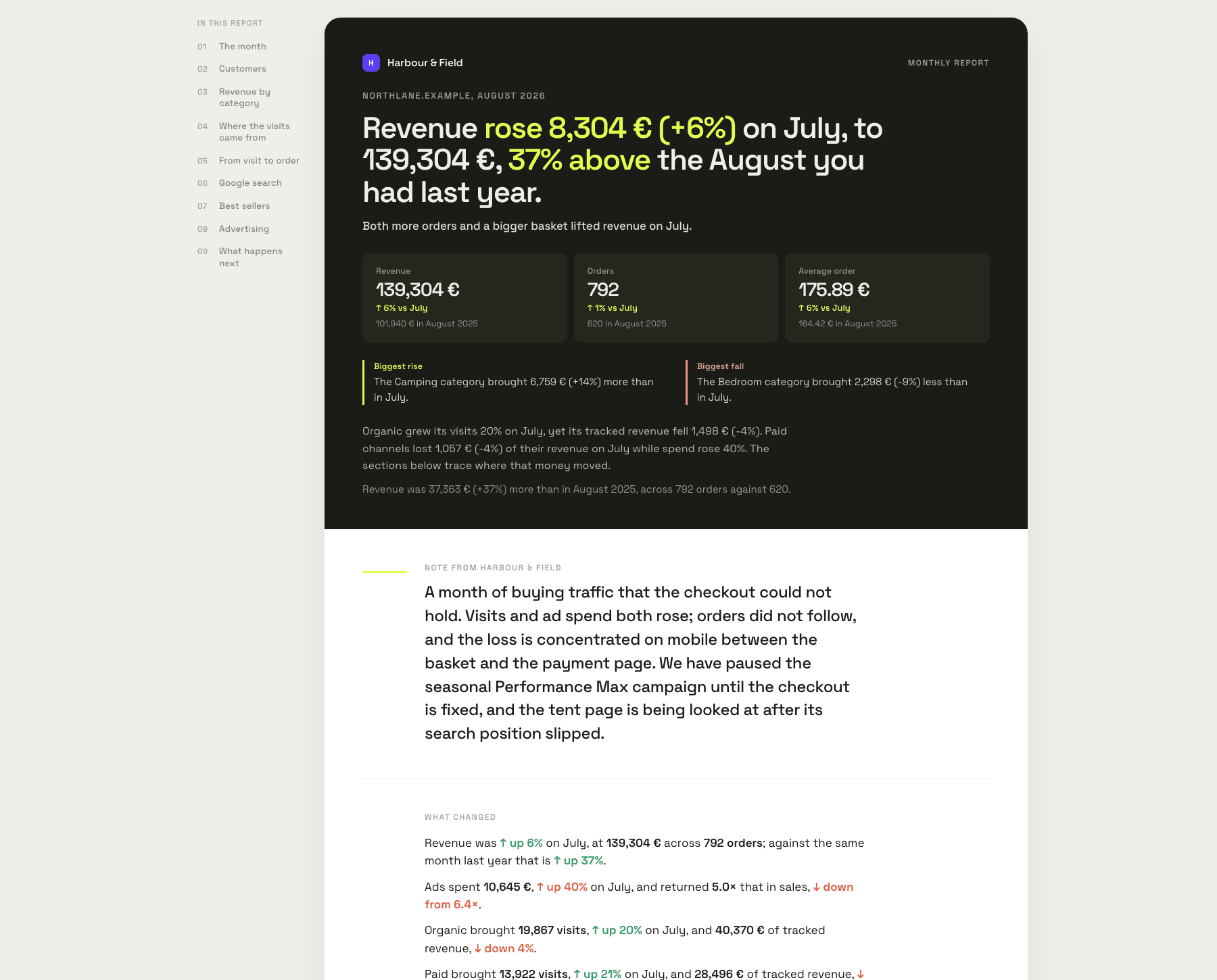
The briefing screen as the app renders it, with the sample shop's figures.
Names the product, not the metric
“merino base layer” fell from 4 to 11 on its main query. That page made €2,900 last month.
Reads refunds against your usual
Refunds reached 9% of revenue over seven days, from a usual 3%. Two sizes of one jacket.
Knows what a normal Tuesday looks like
Tuesday landed 34% under its usual Tuesday. Checkout had been throwing errors since a theme update.
Checks GA4 against your orders
GA4 recorded 91% of confirmed orders. Every missing one paid by PayPal.
Before you install the module.
- Which OpenCart versions work?
- OpenCart 3.0 and OpenCart 4. We test on 3.0.5 and 4.1, and the module's reading code runs on PHP 7.2 to 8.5. If you run another release and it does not connect, tell us the version.
- Why do I need a module at all?
- OpenCart has no API for reading orders. Its built-in API belongs to the admin's order editor: it creates orders and cannot list them. The module adds a read-only way in, and that is all it does.
- Is the module free?
- Yes. ManteIQ itself starts with a 30-day trial without a card; plans are on the pricing page.
- Can the module or ManteIQ change anything in my shop?
- No. The module answers read requests only and has no code that writes to your orders, products or customers. It adds one settings page and touches no theme or template.
- What customer data is read?
- Order lines, amounts, statuses, shipping methods and countries. Of the customer, the email and the country: the email only to tell a first order from a repeat one, and it is replaced by an irreversible hash before anything is stored. Names, addresses and phone numbers never leave the shop.
- How is the key protected?
- The key never travels. Each request carries a signature made with it and the time, and the shop refuses a signature more than five minutes old. Make a new key on the module's page at any time and the old one stops working at once.
- Which orders count as a sale?
- The ones in the statuses your own shop treats as live: the Processing and Complete order statuses on the Option tab of your shop's settings. Cancelled, refunded and failed orders are shown and not summed, and a checkout that was never confirmed is not counted as an order. You can overrule any status in ManteIQ.
- Is anything missing compared with other platforms?
- Two things OpenCart does not record, so ManteIQ does not show them: partial refunds (an order is refunded as a whole, by its status) and what a product cost you. Abandoned carts are counted from the last checkout step, the only point where OpenCart keeps a record, so the figure is smaller than a cart count on other platforms and ManteIQ says so wherever it shows it.
- What if my shop is behind Cloudflare or a firewall?
- ManteIQ reads the shop over the web, so the firewall has to let it through. A challenge page reads exactly like a refused key; ManteIQ names the vendor when it can and shows the allow rule to add.
- Will reading the shop slow it down?
- Reads come in pages of 200 orders every two hours, one request at a time. The first history pull is the biggest read and runs once.
- How do I remove it?
- Uninstall the module under Extensions, Modules: its key is deleted and the reads stop. To pause instead, switch its status off. Disconnect in ManteIQ destroys the key stored on our side, and deleting your ManteIQ account removes the stored data too.
- Do you support PrestaShop, WooCommerce or Shopify?
- PrestaShop and WooCommerce, yes, each with a read-only key. Shopify is next in line.
The messages you might see, and what they mean.
- “The key doesn't match this shop”
- The key in ManteIQ is not the one the module holds now. Someone pressed Make a new key, or the key was copied only in part. Copy it again from the module's page and paste it under Sources.
- “We reached your shop, but the ManteIQ Connector isn't installed there”
- The address answers, the module does not. Finish the install under Extensions, Extensions, Modules: uploading the file is only the first half. Check too that the address is the shop's own and not the admin's.
- “The ManteIQ Connector is switched off in your shop”
- Its status was set to off on the module's page. Switch it on and save.
- “Your shop answered with a page instead of data”
- Maintenance mode, or a security check in front of the shop, answered in place of the module. Switch maintenance mode off, or allow ManteIQ through, then try again.
- OpenCart answers “Invalid file type” when you upload
- The browser renamed the download, for example to manteiq.ocmod (1).zip. Rename it back to manteiq.ocmod.zip and upload again.