PrestaShop integration (1.7.x to 9.x)

PrestaShop analytics and reporting, explained every morning.

One briefing every morning, built from your orders, your search traffic and your ad spend together. The free module connects the shop in one click, with a key that can only read.

Read-only key. No theme changes. Works on multistore.
Your PrestaShop todayExample briefing · Thursday 27 August
Connected
Revenue yesterday€8,420+6% vs usual Thursday
Orders112+9 vs usual Thursday
Organic clicks1,940−4% week on week
Ad spend€6103.1× revenue against spend
Needs you today
“merino base layer” slipped from 4 to 11 on its main query. That page made 8% of last week's revenue.
Refunds reached 9% of revenue over seven days, from a usual 3%. Two sizes of one jacket.
Versions
1.7 to 9
Connects via
Module or webservice key
Permissions
View and Fast view (GET, HEAD)
Setup time
About three minutes
Refresh
Every two hours
Multistore
Yes, every shop
01Two ways to connect

The module needs one click. The key by hand needs nothing installed.

Both give ManteIQ the same read-only key. Pick on your hosting. The features are the same.

ManteIQ module

Recommended

A free zip you upload once. It switches the webservice on if it was off, creates one key with View and Fast view on exactly the resources ManteIQ reads, and hands it to ManteIQ server to server, never through your browser.

  • No permissions table: the module sets the resource list and keeps it current
  • Multistore handled: the key is associated with every shop of the install
  • Its own page shows whether ManteIQ is reading the shop and when it last did
  • Disconnect or uninstall removes the key and tells ManteIQ
Setup timeAbout three minutes

Webservice key by hand

Alternative

PrestaShop's own webservice, restricted to reading. Useful when your host blocks outgoing connections from PHP, or when you want to see every permission before you grant it.

  • Nothing to install, no files on the server
  • Tick View and Fast view per resource; View alone fails the connection test
  • Narrow or revoke the key from the back office at any time
  • The same guide sits next to the form in ManteIQ
Setup timeAbout five minutes
02Setup guide

Connect PrestaShop with the module, in four steps.

Four steps, about three minutes: back office first, then your browser.

  1. 01

    Upload the module

    Download the zip, then Modules › Module Manager › Upload a module and pick it. Open Configure.

    manteiqconnector.zip, v1.0.0Modules › Module Manager
  2. 02

    Click Connect to ManteIQ

    The module switches the webservice on, creates one read-only key and hands it to ManteIQ over HTTPS. ManteIQ reads the shop once with it and answers with a short code.

    ManteIQ Connector › Connect
  3. 03

    Finish in your browser

    Open the link, sign in or create an account, and say whether this shop is a new site or one you already have. Timezone and currency come from the shop.

    manteiq.com › /connect/prestashop
  4. 04

    The history read starts

    The first pull fetches sixteen months of orders in the background. Your first briefing lands the next morning.

    ManteIQ › Sources › PrestaShop

What the key can read, and nothing else

View and Fast view (GET and HEAD) only. No Modify, Add or Delete on anything.
Required. Without these ManteIQ cannot read orders at all
  • ordersevery revenue and order figure
  • order_detailsline items, costs and product names on Sales
  • customersnew against returning buyers
  • configurationsyour shop's name, default currency and version
Optional. Each one buys one block of the report
  • cartsabandoned cart counts
  • productsreal product names instead of raw line text
  • categoriesthe category split on Sales
  • carrierscarrier names on shipping
  • addressesthe shipping-country split
  • countriesthe shipping-country split
  • order_discountsthe per-code discount split
  • order_statesyour order states by name in “How we count your orders”
  • order_historieswhen each order was paid, shipped and delivered

Making the key by hand instead

Five steps in the back office. The module exists to save you these; the key is the same either way.
  1. 1.Sign in to your back office as an administrator and open Advanced Parameters › Webservice.
  2. 2.Set Enable PrestaShop's webservice to Yes and save.
  3. 3.Add a new webservice key. Click Generate, describe it as ManteIQ, leave Status on Yes.
  4. 4.In the permissions table tick View and Fast view for the resources above, the four required ones at least.
  5. 5.Save, then paste the key and your shop address into ManteIQ under Sources › PrestaShop. The same guide sits next to the form.
03What ManteIQ reads

Shop data on one side, Google data on the other, one briefing out.

PrestaShop

  • Orders, revenue, refunds and what each order state means
  • Line items, product names, categories, carriers, discount codes
  • Paid, shipped and delivered dates from the order history
  • New against returning buyers, from a hashed customer id

Search Console

  • Queries, clicks, impressions, CTR
  • Average position per page
  • The keywords you track, named when they move
  • Sixteen months of history

Analytics 4

  • Sessions by channel and landing page
  • view_item, add_to_cart, begin_checkout, purchase
  • Purchases and revenue by source and campaign
  • Device split

Google Ads

  • Cost and conversions by campaign
  • The search terms you paid for
  • Spend next to the shop's own revenue
  • Sixteen months of history
Never

No writes of any kind: prices, stock, orders, products and customer records are never modified. Customer emails are hashed before storage, and no name, email or address ever appears in a briefing.

04The product itself

What a connected shop gets every morning.

The briefing screen as the app renders it, with the sample shop's figures.

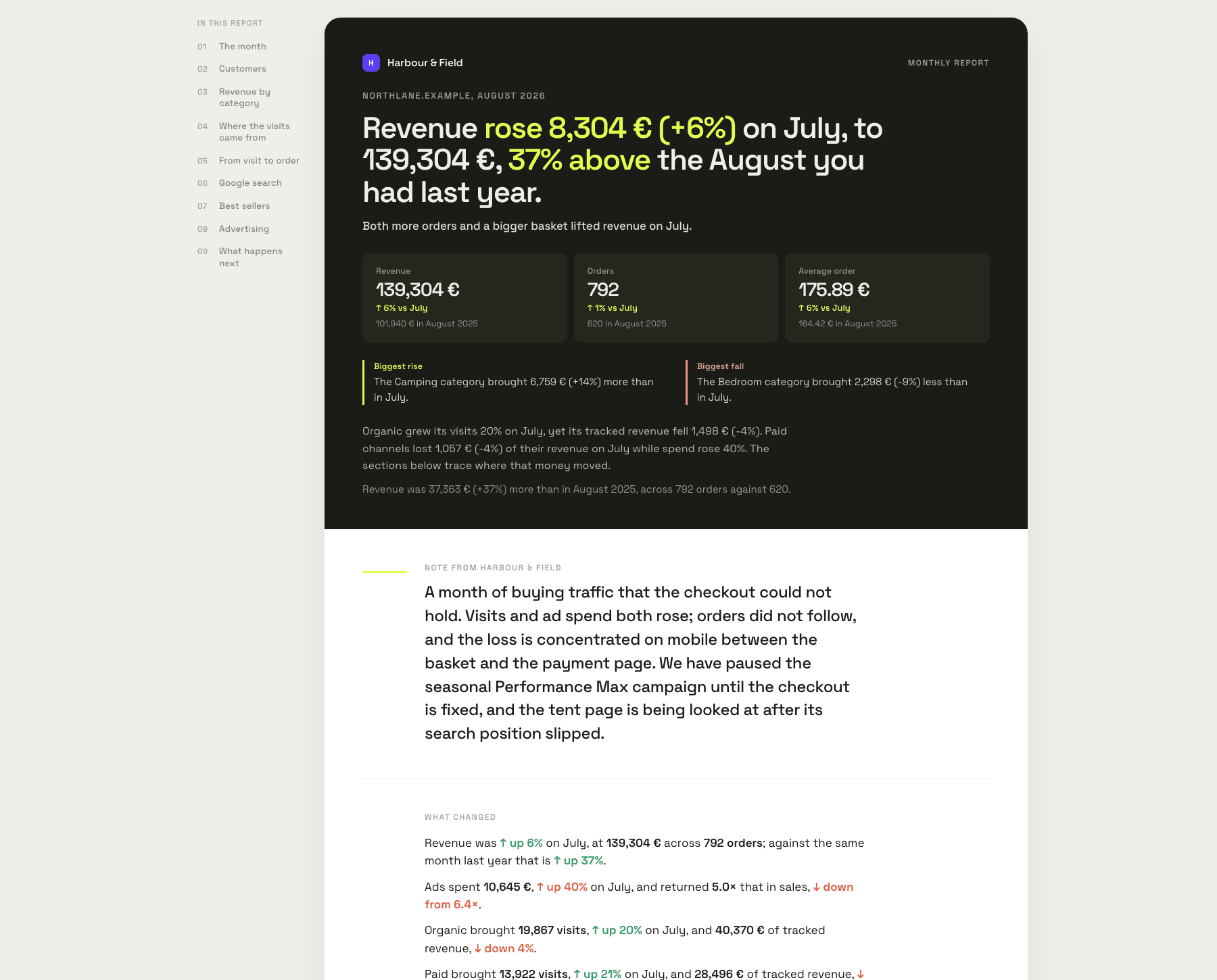
The demo shop’s monthly report: revenue, orders, average order value and the agency’s summary.
The demo shop’s monthly report, generated by ManteIQ.Open the sample report
Daily briefing · 07:00Revenue €8,420 yesterday, 6% over its usual Thursday. Two things need you today.07:00
Alert“waterproof hiking jacket” fell from 4 to 9 this week. That page made €4,180 last month.11:02
ReplyWhich products drove yesterday? → Merino Base Layer, 38 units, then the Trail Shell in two sizes.11:06
The same briefing in Telegram.

Names the product, not the metric

“merino base layer” fell from 4 to 11 on its main query. That page made €2,900 last month.

Reads refunds against your usual

Refunds reached 9% of revenue over seven days, from a usual 3%. Two sizes of one jacket.

Knows what a normal Tuesday looks like

Tuesday landed 34% under its usual Tuesday. Checkout had been throwing errors since a theme update.

Checks GA4 against your orders

GA4 recorded 91% of confirmed orders. Every missing one paid by PayPal.

05PrestaShop questions

Before you generate the key.

Which PrestaShop versions work?
1.7.0 through 9, on PHP 5.6 to 8.4. The module uses the classic module API only, no Symfony and no Composer, which is what stays the same across those releases. A key made by hand works on the same versions.
Is the module free?
Yes, and open source under the MIT licence. ManteIQ itself starts with a 30-day trial without a card; plans are on the pricing page.
Is the webservice safe to enable?
The key ManteIQ uses has View and Fast view only, on a named list of resources. PrestaShop refuses every write with it. Narrow it or delete it from the back office at any time and ManteIQ marks the source disconnected.
Can the module or ManteIQ change anything in my shop?
No. View and Fast view are GET and HEAD, the two HTTP methods that read. ManteIQ never sends a write, and the module never touches your theme, templates or catalogue.
What customer data is read?
Order lines, amounts, states, carriers and countries. Customer records are read only to tell a first order from a repeat one, and the email is replaced by an irreversible hash before anything is stored. No names, no addresses, no phone numbers.
Does it work with PrestaShop multistore?
Yes. The module associates the key with every shop of the install. Connect each shop address as its own ManteIQ site, each with its own briefing.
What if my shop is behind Cloudflare or a firewall?
ManteIQ reads the shop over its webservice, so the firewall has to let it through. Cloudflare's challenge page reads exactly like a refused key; ManteIQ names the vendor when it can and shows the allow rule to add. The module does not change this: it creates the key, the reads still come from ManteIQ.
Will reading the shop slow it down?
Reads come in pages of a few hundred rows every two hours, with at most three requests in flight: the load profile of a couple of visitors, not a crawler. The first history pull is the biggest read and runs once.
My host blocks outgoing connections. Can I still use it?
Yes. The one-click hand-over needs the shop's server to reach manteiq.com; without it, the module shows the key it created and you paste it into ManteIQ yourself. Everything after that works the same.
How do I remove it?
Click Disconnect on the module page, or uninstall the module. Either removes the webservice key and tells ManteIQ, which marks the source as disconnected. Deleting your ManteIQ account removes the stored data too.
Is it on PrestaShop Addons?
It is being submitted. Until it is listed, download the zip from this page; it is the same file.
Do you support WooCommerce, OpenCart or Shopify?
WooCommerce, yes: make a read-only REST API key under WooCommerce → Settings → Advanced → REST API, paste it into Sources, and the same briefing reads your orders. OpenCart, yes: install the free ManteIQ Connector module and paste the shop address and key it shows. Shopify is next in line.

06When it does not connect

The messages you might see, and what they mean.

“Could not reach ManteIQ from this server”
Your hosting blocks outgoing connections from PHP. The key was still created: the module page shows it together with your shop address, and you can paste both into ManteIQ under Sources. Ask your host to allow HTTPS to manteiq.com if you want the status on the module page.
“ManteIQ reached your shop, but the key can't read: orders, …”
The webservice answers but refuses the resource. Usually /api is not being rewritten: on Apache regenerate .htaccess (Advanced Parameters › Performance › Clear cache does it, or toggle the webservice off and on); on nginx make sure the /api rewrite from PrestaShop's sample config is in place.
“Invalid or expired API key” on the Sources screen
The key was deleted in the back office, or a firewall in front of the shop answered instead of PrestaShop. Cloudflare's challenge page reads exactly like a refused key. ManteIQ names the vendor when it can and shows the allow rule to add. Otherwise click Connect in the module again for a fresh key.
The shop connected, but sales blocks are missing
The key can read orders but not one of the optional resources. Sources › PrestaShop › Test connection lists each resource by name. Tick the missing one under Advanced Parameters › Webservice, or click Connect in the module again; it always sets the full list.
Two shops, one PrestaShop
Connect each shop address as its own ManteIQ site. The same module key serves all shops of a multistore.

Generate the key now, read your first briefing tomorrow morning.

30 days free. No card. Revoke the key and it all stops.
Changelogv1.0.0, 28 August 2026. First release: one-click pairing, status on the module page, Disconnect and uninstall remove the key.
LicenceMIT. The source ships in the zip; read every line before you install it, we did.
Something not right?info@manteiq.com
ManteIQ - Sees the change. Helps you act.