
WooCommerce analytics and reporting, explained every morning.
One briefing every morning, built from your orders, your search traffic and your ad spend together. A read-only key connects the shop in about a minute, and there is no plugin to install.
Read-only key. No plugin. No customer names or addresses.- Versions
- WooCommerce with the REST API
- Connects via
- Read-only REST API key
- Access
- Read-only, nothing is written
- Setup time
- About a minute
- Refresh
- Every two hours
- Customer data
- Email and country only
ManteIQ never asks for your WordPress password. It asks for a key that can only read.
WooCommerce has a REST API built in, and its keys carry one permission: Read, Write, or both. You make a Read key, so the most ManteIQ can do with it is look.
| Your WordPress login | A Read REST API key | |
|---|---|---|
| Can see orders and products | Yes | Yes |
| Can change prices, stock or orders | Yes | No, the key is Read only |
| Can open your WordPress admin | Yes | No |
| Can be switched off without touching your own login | No | Yes, revoke it under WooCommerce, Settings, Advanced |
- Can see orders and productsYour WordPress loginYesA Read REST API keyYes
- Can change prices, stock or ordersYour WordPress loginYesA Read REST API keyNo, the key is Read only
- Can open your WordPress adminYour WordPress loginYesA Read REST API keyNo
- Can be switched off without touching your own loginYour WordPress loginNoA Read REST API keyYes, revoke it under WooCommerce, Settings, Advanced
Connect WooCommerce in four steps.
About a minute: three steps in your WordPress admin, one in ManteIQ.
- 01
Open the REST API page
In your WordPress admin, open WooCommerce, then Settings, then the Advanced tab, then REST API. Click Add key.
WooCommerce › Settings › Advanced › REST API - 02
Make a Read key
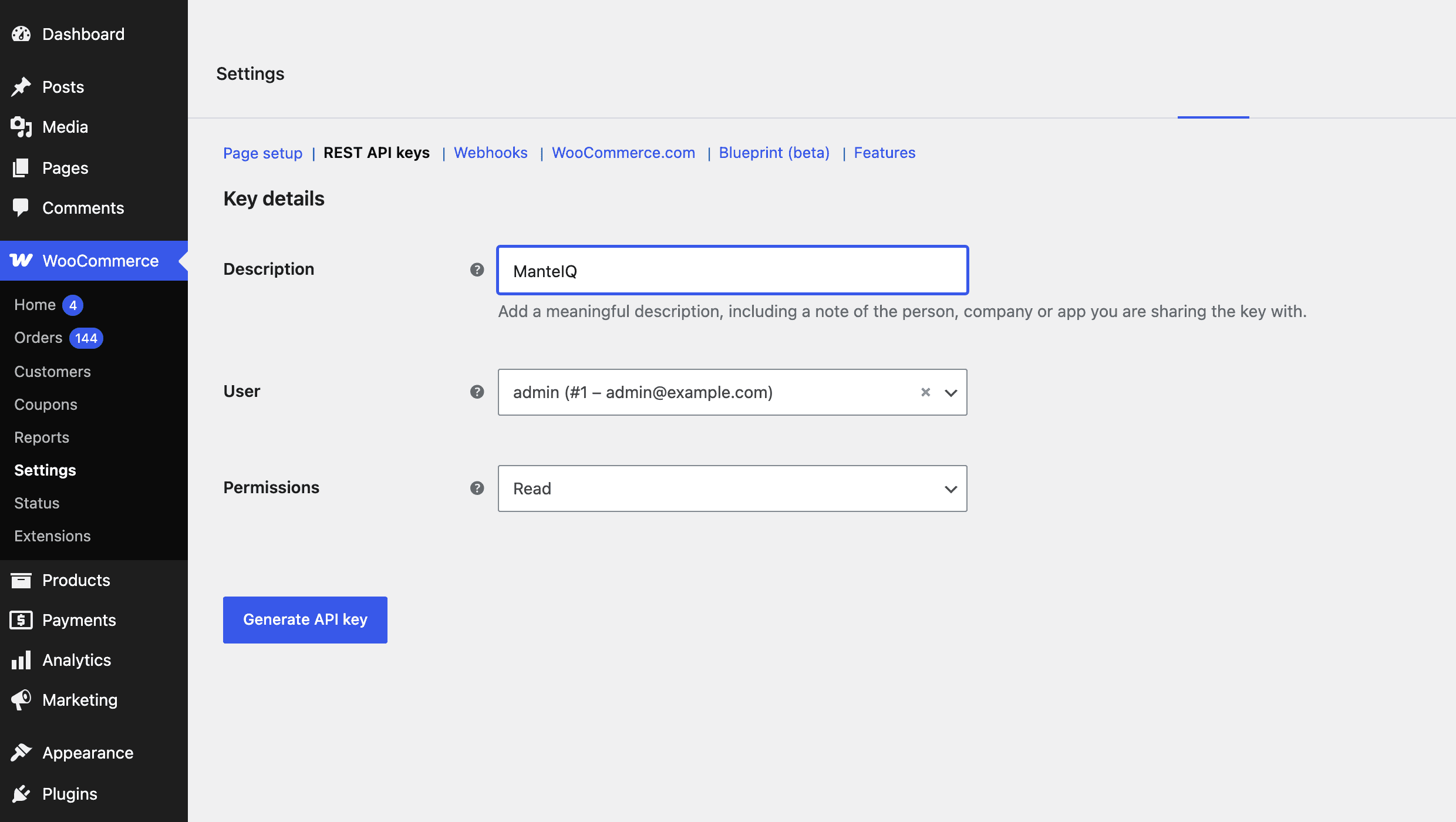
Set Description to ManteIQ, pick an administrator or shop manager as the user, and set Permissions to Read. Click Generate API key.
Permissions › Read - 03
Copy both values
WooCommerce shows the Consumer key and the Consumer secret once. Copy both before you close the page; if you lose the secret, make a new key.
ck_… and cs_… - 04
Paste them into ManteIQ
Paste the key, the secret and your shop address under Sources. ManteIQ tests the key before it saves it. The first read fetches sixteen months of orders, and your first briefing lands the next morning.
ManteIQ › Sources › WooCommerce
What a Read key lets ManteIQ ask for, and nothing else
Read requests only. A Read key cannot change the shop.| ManteIQ asks for | And uses it for |
|---|---|
| Orders with their totals | Every revenue and order figure |
| Order lines and coupon codes | Products, categories and discounts on the Sales page |
| Refunds on each order | Net revenue, so a partial refund reduces the figure by its amount |
| Your order statuses | Which orders count as a sale |
| Products and categories | Names, and the category each product belongs to |
| The buyer's email and country | New against returning buyers, and where orders ship |
- Orders with their totalsAnd uses it forEvery revenue and order figure
- Order lines and coupon codesAnd uses it forProducts, categories and discounts on the Sales page
- Refunds on each orderAnd uses it forNet revenue, so a partial refund reduces the figure by its amount
- Your order statusesAnd uses it forWhich orders count as a sale
- Products and categoriesAnd uses it forNames, and the category each product belongs to
- The buyer's email and countryAnd uses it forNew against returning buyers, and where orders ship
Shop data on one side, Google data on the other, one briefing out.
WooCommerce
- Orders, revenue and what each order status means
- Line items, product names, categories, shipping methods, coupon codes
- Refunds, netted off the order they belong to
- New against returning buyers, from a hashed customer email
Search Console
- Queries, clicks, impressions, CTR
- Average position per page
- The keywords you track, named when they move
- Sixteen months of history
Analytics 4
- Sessions by channel and landing page
- view_item, add_to_cart, begin_checkout, purchase
- Purchases and revenue by source and campaign
- Device split
Google Ads
- Cost and conversions by campaign
- The search terms you paid for
- Spend next to the shop's own revenue
- Sixteen months of history
No writes of any kind: prices, stock, orders, products and customer records are never modified. Customer emails are hashed before storage, and no name, address or phone number is kept.
What a connected shop gets every morning.
The briefing screen as the app renders it, with the sample shop's figures.
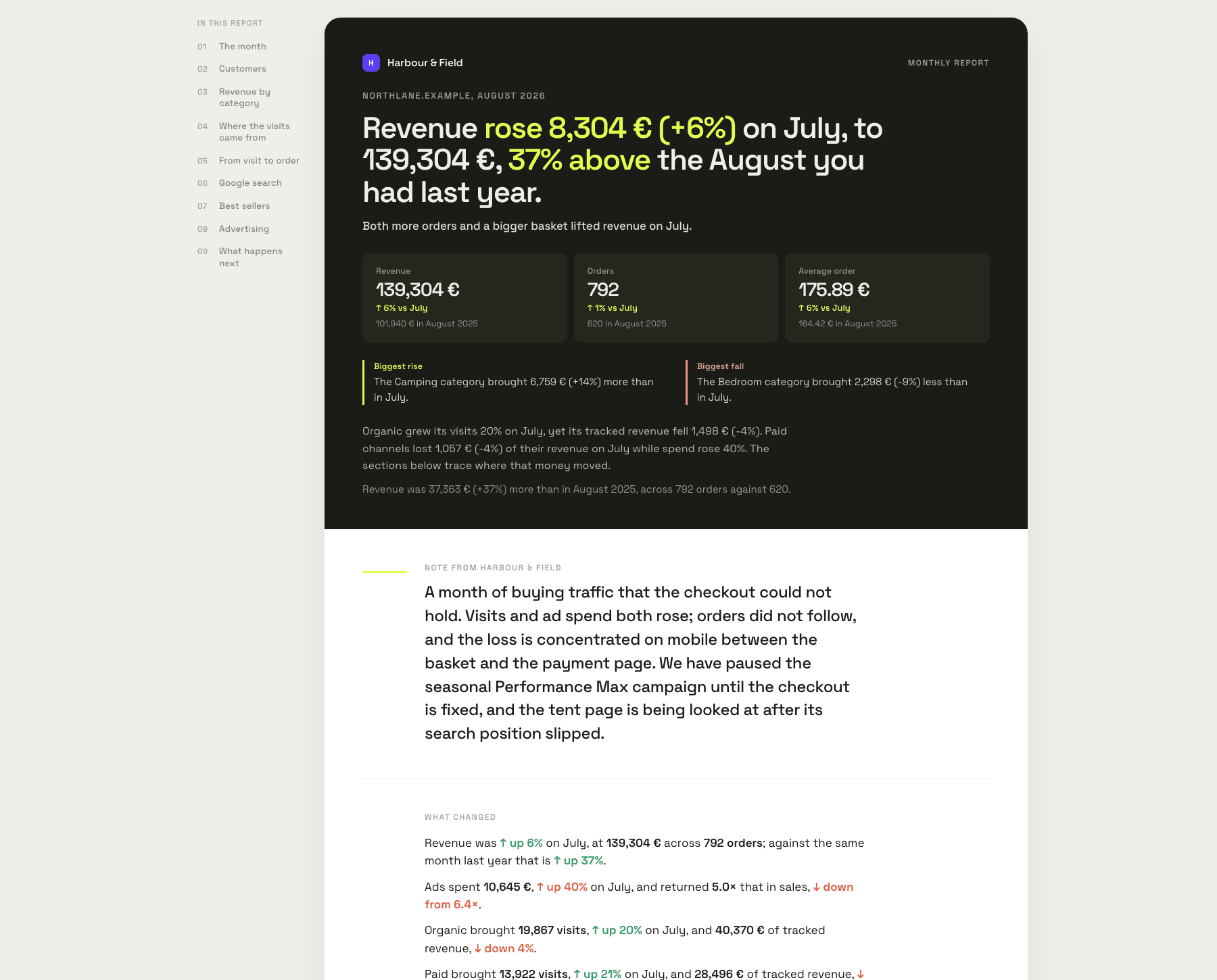
Names the product, not the metric
“merino base layer” fell from 4 to 11 on its main query. That page made €2,900 last month.
Reads refunds against your usual
Refunds reached 9% of revenue over seven days, from a usual 3%. Two sizes of one jacket.
Knows what a normal Tuesday looks like
Tuesday landed 34% under its usual Tuesday. Checkout had been throwing errors since a theme update.
Checks GA4 against your orders
GA4 recorded 91% of confirmed orders. Every missing one paid by PayPal.
Before you make the key.
- Do I need to install a plugin?
- No. WooCommerce's REST API is part of WooCommerce, so a key made in its settings is the whole connection. Nothing is added to your theme, your plugins or your database.
- Which WooCommerce versions work?
- Any version with the REST API at wc/v3, which is every current release. We test on WooCommerce 11. If yours does not connect, tell us the version.
- Is it free to connect?
- Yes. ManteIQ itself starts with a 30-day trial without a card; plans are on the pricing page.
- Can ManteIQ change anything in my shop?
- No. The key is made with the Read permission, and ManteIQ only ever sends read requests. WooCommerce itself refuses writes from a Read key.
- What customer data is read?
- Order lines, amounts, statuses, shipping methods and countries. Of the customer, the email and the country: the email only to tell a first order from a repeat one, and it is replaced by an irreversible hash before anything is stored. Names, addresses and phone numbers are not kept.
- How is the key protected?
- The secret is encrypted before it is stored and is never shown again. Each request is signed with it, so the secret itself does not travel. Revoke the key in WooCommerce at any time and the reads stop at once.
- Which orders count as a sale?
- Processing, On hold and Completed, the statuses WooCommerce's own reports count. Cancelled, refunded, failed and pending orders are shown and not summed. A status added by a plugin counts until you say otherwise, and you can overrule any status in ManteIQ.
- Is anything missing compared with other platforms?
- Two things WooCommerce does not expose to a REST key, so ManteIQ does not show them: abandoned carts, because WooCommerce keeps no cart records a key can read, and what a product cost you. Shops that use several currencies through a plugin are not converted.
- What if my shop is behind Cloudflare or a security plugin?
- ManteIQ reads the shop over the web, so a firewall or a plugin that switches the REST API off has to let it through. A challenge page reads exactly like a refused key; ManteIQ names the vendor when it can and shows the allow rule to add.
- Will reading the shop slow it down?
- Reads come in pages of 100 orders every two hours, two requests at a time, which is gentle enough for shared hosting. The first history pull is the biggest read and runs once.
- How do I remove it?
- Delete the key under WooCommerce, Settings, Advanced, REST API: the reads stop at once. Disconnect in ManteIQ destroys the key stored on our side, and deleting your ManteIQ account removes the stored data too.
- Do you support PrestaShop, OpenCart or Shopify?
- PrestaShop and OpenCart, yes, each with its own read-only connection. Shopify is next in line.
The messages you might see, and what they mean.
- “The consumer key or consumer secret is wrong, or the key was revoked”
- One of the two values was copied in part, or the key was deleted in WooCommerce. WooCommerce shows the secret only once, so make a new key with the Read permission and paste both values again under Sources.
- “WordPress's REST API didn't answer”
- Check the address: enter it exactly as it loads in a browser, like https://your-shop.com, without /wp-json at the end. If your shop redirects www to non-www, or the other way round, use the address it ends on. Then check that no security plugin has switched the REST API off.
- “WordPress answered, but WooCommerce's API isn't there”
- WooCommerce is not installed, not active or out of date. Activate or update it and try again.
- “Your shop answered with a page instead of data”
- A maintenance or coming-soon plugin, a login page or a security check in front of the REST API answered in place of WooCommerce. Pause it, or allow ManteIQ through, then try again.
- “The key can't read” one of the resources
- The user behind the key cannot read what ManteIQ asks for. Make the key for an Administrator or Shop manager account, with the Read permission.
- “Your shop's server clock is more than 15 minutes off”
- Requests are signed with the time, and your server rejects a signature that old. Fix the server time, then run Sync now.