Why GA4 shows fewer orders than your back office, and how to measure the gap
GA4 and your back office will never agree on orders. The question is by how much, and whether the gap is stable enough to live with.
- 82%of orders GA4 saw in the worked example below: 338 of 412
- 4reasons an order never reaches GA4
- 5 minto measure your own gap
Four reasons an order never reaches GA4
- Ad blockers and privacy browsers stop the GA4 script before it loads.
- The customer declines analytics cookies, and consent mode sends nothing or a cookieless ping.
- The customer pays off-site and never returns to the confirmation page.
- The confirmation page loads, but the purchase event fires before the script is ready.
None of these are bugs you can fix in GA4. They are properties of the browser, so the honest approach is to measure the gap and remember it when reading any GA4 revenue number.
Measure your own gap in five minutes
How much of your sales does GA4 see?
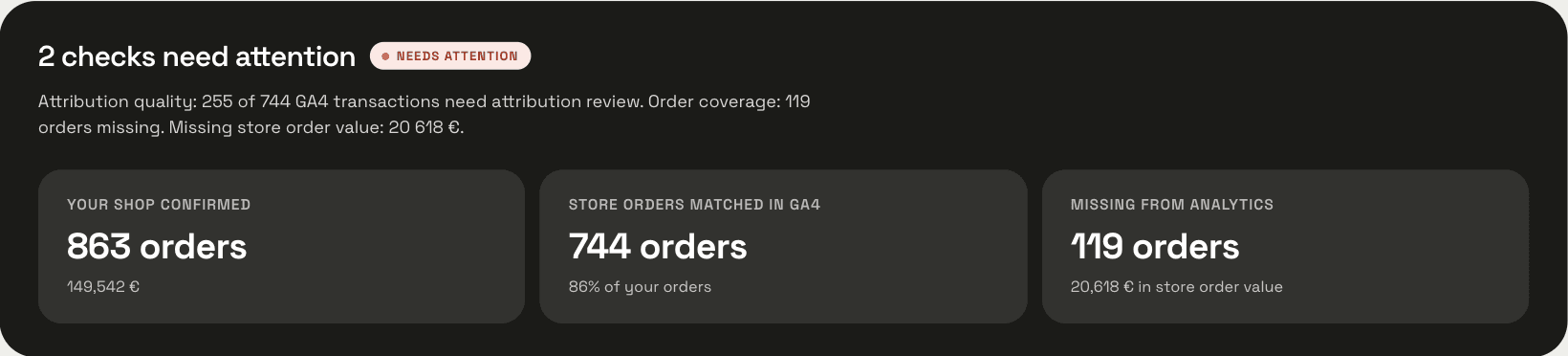
Type the order count from your back office and the purchase count from GA4 for the same 30 days.
338 seen74 missing
A typical gap. Read GA4 for direction, your back office for totals.
The result is a share of orders, not of revenue. Missing orders are rarely random, so the revenue gap can differ.
Living with the gap
A stable gap is fine: GA4 still shows which channel grew and which product page converts. A gap that moves is not, because every GA4 trend then mixes real change with tracking change. Write the measured share next to every GA4 revenue figure you pass on, so nobody reads it as a total.
Read GA4 for direction and your back office for totals. When the two disagree on direction, trust the back office.
ManteIQ runs this comparison order by order, every day, for PrestaShop, WooCommerce and OpenCart.
How the check worksWhere the two numbers come from
The check needs one count from the shop and one from GA4, for the same 30 days. Here is where each one lives and what to watch when you read it.
One count from the shop, one from GA4
The shop
- Where
- Orders › Orders, filtered by date; every status except cancelled and payment error.
- Where
- Analytics › Orders for the date range.
- Where
- Reports › Sales report, by status.
GA4
- Where
- Reports › Monetization › Ecommerce purchases, or the purchase event under Reports › Engagement › Events.
Each platform's own reports have quirks of their own. How GA4 works on PrestaShop and which modules send what and what WooCommerce Analytics counts and excludes go through them in detail.
What the gap does to your ad numbers
Every revenue figure that starts in GA4 inherits the gap. When Google Ads reads its conversions from GA4, the return on ad spend it shows is understated by the same share: a campaign that appears to return three times its spend may return closer to four.
The fix is not to inflate GA4. Read channel comparisons in GA4, where every channel loses roughly the same share, and read totals and return on spend from the shop's own orders, matched to the campaign where you can.
Same discipline as the weekly abandoned-carts check: the same window, the same rule, written down next to the number.
Questions
- Does server-side tagging close the gap?
- It narrows it. Ad blockers no longer matter, but declined consent and off-site payments still lose the order.
- Should I compare revenue instead of orders?
- Start with orders. Revenue adds tax, shipping and refund differences on top of the tracking gap.
- Why does GA4 show more purchases than orders on some days?
- Duplicate purchase events: the confirmation page fired twice, or a refresh sent the event again. GA4 removes duplicates only when the transaction id is the same, so check that the module sends the order id as the transaction id.
- Does the gap change my conversion rate in GA4?
- Yes. GA4's purchase rate divides purchases by sessions, and the two are undercounted by different shares, so they do not cancel out. Read the rate for direction, not for the level.
- How often should I measure the gap?
- Monthly is enough once it is stable. After any change to the cookie banner, the tracking module or the payment provider, measure the next 30 days again.
Sources
About the author: Mantas Lukošius
Mantas has worked in ecommerce for more than 15 years, almost all of it on PrestaShop: from his own first shop to business stores and large clients. He builds ManteIQ. Ecommerce and the data behind it are still what he enjoys most.
How we write and check what we publish